GE Smart Refrigerator Error Code E-WiFi
E-WiFi on a GE smart refrigerator (GFE28, GNE27, GYE22, PYE22 series), or "Unable to connect" in SmartHQ, means the separate Wi-Fi adapter board cannot talk to the main control board. The good news: because GE uses a modular, replaceable adapter — unlike Samsung and LG, which integrate Wi-Fi into the main board — this…
GE's modular Wi-Fi design#
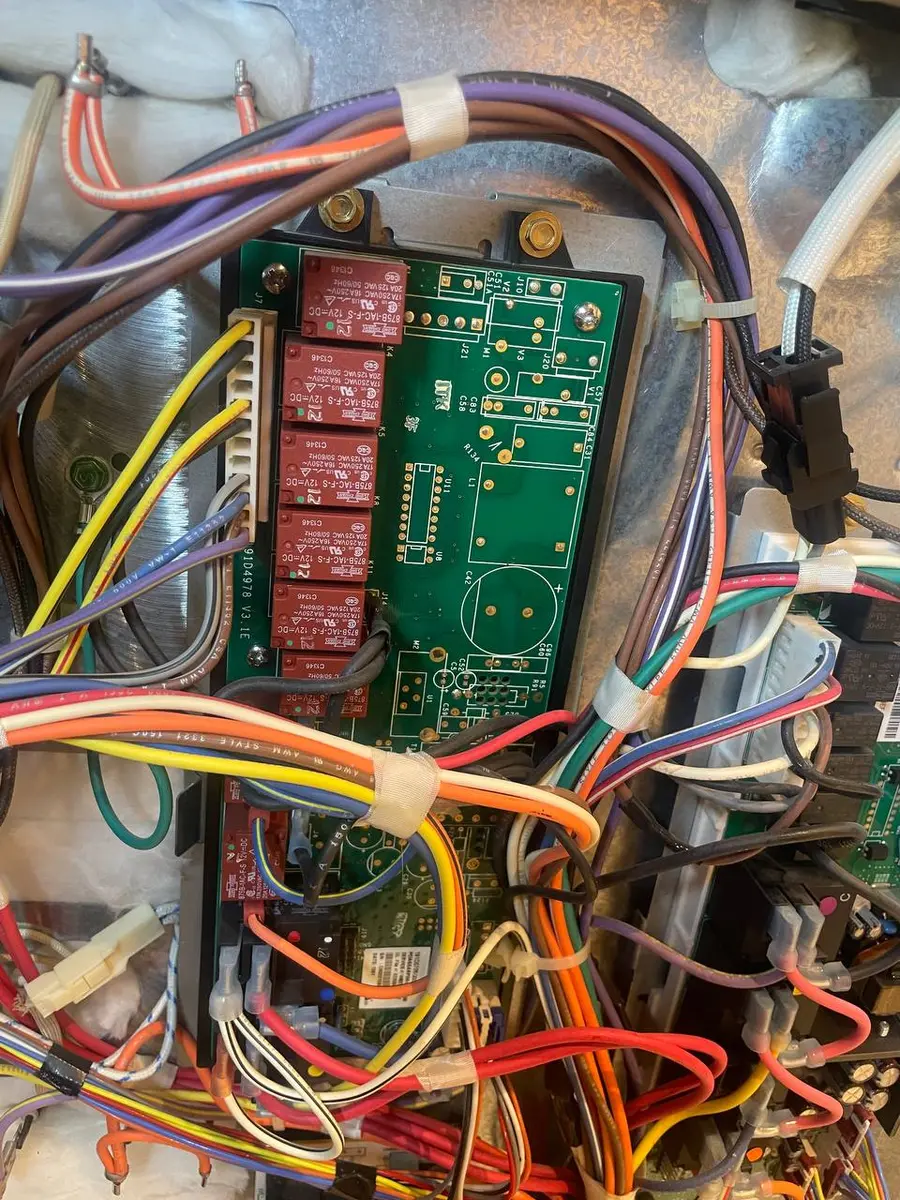
GE puts Wi-Fi on a small separate board (WR55X31130 for refrigerators, WH22X29556 on some washers) that connects to the main control board by a ribbon cable. That independence is the key point: a Wi-Fi failure does not drag the expensive main board with it, so GE Wi-Fi repairs cost far less than integrated designs.
What E-WiFi indicates#
Four possibilities: the adapter board failed internally; the ribbon cable came loose or is damaged; the main board's communication port failed (rare); or the adapter's firmware corrupted.
Do You Have the Right Tools?
Refrigerant gauges ($200+), vacuum pump ($250), leak detector ($150), and EPA-certified recovery equipment. Our technician arrives with $3,000+ in professional tools — your diagnostic is free.
Licensed & Insured · 90-Day Warranty · Same-Day Service
Diagnosis#
- Power cycle. Unplug the fridge for three minutes; the adapter firmware reloads on boot. If E-WiFi clears, watch for recurrence — intermittent failures often precede a full module failure within weeks.
- Check the ribbon cable. Remove the upper back panel (a few Phillips screws). The small adapter PCB sits near the main board; reseat its ribbon connector firmly and look for creasing or torn traces.
- Test the adapter. Disconnect the adapter and power up. If E-WiFi clears (the fridge no longer tries to reach it), the adapter is the failing part. If E-WiFi persists with it disconnected, the main board's port may be at fault.
- Replace the adapter. Swapping the adapter (WR55X31130) takes about 15-20 minutes — pull the panel, unplug the old board, plug in the new one, replace the panel, and re-pair in SmartHQ.
Re-pair after replacement#
Power on, then hold the Wi-Fi Connect button (location varies — check the display) for a few seconds, open SmartHQ > Add Appliance > Refrigerator, and join your 2.4 GHz network. The adapter comes without your credentials, so a fresh pairing is expected.
Safety First — Know the Risks
Refrigerant (R-134a/R-600a) requires EPA certification to handle. Improper discharge is a federal violation and health hazard. Our techs are licensed and insured — let them handle the risk.
Licensed & Insured · 90-Day Warranty · Same-Day Service
Smart feature or hardware?#
E-WiFi is a smart-hardware issue in about 60% of cases — a failed adapter board or ribbon cable — and a firmware or configuration hiccup the other 40%, where a power cycle clears it. Either way, cooling, ice, and water are unaffected, so there is no urgency beyond wanting the app back.
Why GE's design saves you money here#
The reason E-WiFi is a relatively painless code comes down to that one architectural choice. On brands that fold the Wi-Fi radio into the main control board, losing Wi-Fi can mean replacing the whole board — the same board that runs cooling logic and everything else — which is an expensive part. GE isolates the radio on a cheap little adapter, so when the connectivity dies you replace only the connectivity, not the brains of the fridge. It is the same logic that makes Bosch dishwashers cheaper to fix for Wi-Fi problems: a separate module is a small, swappable, inexpensive part, while an integrated one ties the cheap failure to the expensive board. If smart-repair cost matters to you, that modular-versus-integrated distinction is worth checking before you buy.
The Real Cost of DIY
Average DIY attempt: $150-400 in tools you may use once, plus the risk of further damage. Our diagnostic visit costs $0 — we find the problem and give you an honest quote.
Licensed & Insured · 90-Day Warranty · Same-Day Service
Prevent it#
Make sure the ribbon cable is fully seated after any back-panel service, use a surge protector (voltage spikes can corrupt the adapter firmware), and after an outage confirm SmartHQ shows the fridge online within about ten minutes. If E-WiFi keeps flickering, the ribbon connector pins may be oxidizing — a little contact cleaner at the next service visit helps.
GE fridge showing E-WiFi? Book a free diagnostic — our technicians handle both the connected side and the traditional repair.
Senior Appliance Repair Technician · 15 years experience
EPA-certified technician with 15 years of experience specializing in refrigerator and cooling system repairs.