
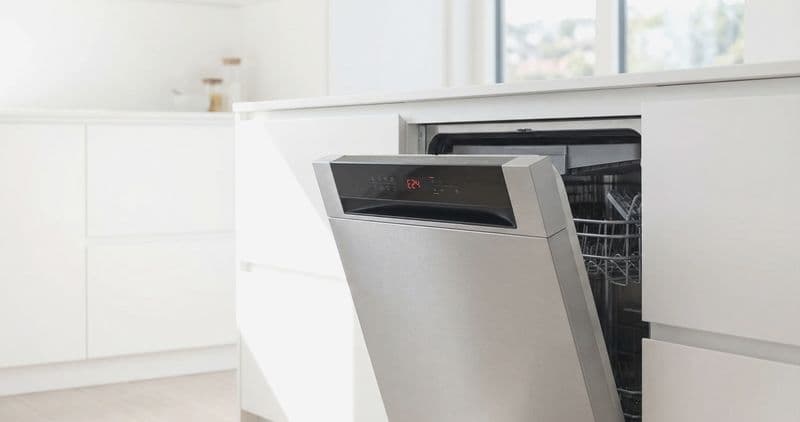
A Bosch [dishwasher](/blog/repair-or-replace-dishwasher) with a dead or blank display has one of three problems, and they are best checked in order: no power reaching the control, a failed control panel or ribbon cable, or a main board that is not driving the display. The single most useful first step is a proper hard reset, because a locked-up controller — not a failed part — is behind a large share of blank displays. Work power, then panel, then board, and you avoid replacing parts that were never broken.
Quick answer#
Do a hard reset first: kill the breaker for five full minutes, then restore power. That clears a frozen controller and revives many blank displays for free. If it stays dark, confirm the machine is actually getting power (outlet or hardwire, and any thermal fuse). Only after power is proven good does the control panel or main board become the suspect — and those are technician repairs.
Do You Have the Right Tools?
Water pressure gauge ($60), spray arm tester, float switch multimeter ($85), and drain inspection camera. Our technician arrives with $3,000+ in professional tools — your diagnostic is free.
Licensed & Insured · 90-Day Warranty · Same-Day Service
Work it in order#
1. Hard reset (free, do this first)#
- Switch off the dishwasher’s circuit breaker — the power button is not enough on a hardwired Bosch.
- Wait five full minutes so the control’s capacitors discharge and the board clears.
- Restore power and check the display. If it lights, it was a lock-up; run a cycle to confirm.
2. Confirm power is arriving#
If the display stays blank and no lights show at all, the machine may not be getting power:
- Verify the breaker is truly on (flip it fully off and back, not just checking it looks on).
- Confirm the supply — many Bosch units are hardwired to a junction box; a loose wire nut there kills everything.
- Where accessible, a technician checks a thermal fuse in the power path; if it has opened, the display goes fully dark and it must be tested with a meter (a good fuse reads continuity; an open one does not).
Causes by likelihood#
| Cause | Share of blank-display cases | Who fixes it |
|---|---|---|
| Locked-up controller (needs reset) | 30% | DIY hard reset |
| Control panel / touch module failure | 25% | Technician |
| Ribbon cable between panel and board | 20% | Technician |
| Power delivery / thermal fuse open | 15% | Technician (meter) |
| Main control board | 10% | Technician |
3. Control panel and ribbon cable#
If power is confirmed and a reset did nothing, the display itself or the flat ribbon cable that links the touch panel to the main board is the usual culprit. A partial display — some segments or buttons dead — points more at the panel or a cracked ribbon; a fully dark panel with a live board points at the panel’s power feed. Both are behind the door’s inner skin and are a technician replacement.
4. Main control board#
Least common, but if the panel and ribbon test good and power is present, the main board is not driving the display. This is confirmed by elimination and replaced as an assembly.
Safety First — Know the Risks
Live 120V wiring in a wet environment is one of the most dangerous DIY scenarios. Water + electricity = serious shock risk. Our techs are licensed and insured — let them handle the risk.
Licensed & Insured · 90-Day Warranty · Same-Day Service
Partial display versus fully dark#
What is missing narrows the fault fast. A fully dark panel with no lights at all is a power or main-board problem — the display is getting nothing to show. A partial display — some segments lit, some buttons dead, or a flickering readout — points at the touch panel itself or a cracked ribbon cable, because power is clearly reaching the panel but not driving all of it. A display that is lit but frozen (unresponsive to buttons) is most often the locked-up controller that a hard reset clears. Sorting your symptom into one of these three saves ordering the wrong part.
Bosch panel types by series#
Older Bosch dishwashers put controls on the top edge of the door with a small front display; newer ones use a full front touch panel or a hidden top-control layout. The failure modes are the same — panel, ribbon, power, or board — but access differs, and the ribbon cable is a more common failure point on the fully integrated touch panels because it flexes every time the door opens. Reading your model tag tells the technician which panel architecture to expect and which ribbon to bring.
The Real Cost of DIY
Average DIY attempt: $150-400 in tools you may use once, plus the risk of further damage. Our diagnostic visit costs $0 — we find the problem and give you an honest quote.
Licensed & Insured · 90-Day Warranty · Same-Day Service
What a technician checks on a dead display#
- Confirms 120V is present at the machine — no incoming power is the first thing to rule out, and it is checked at the junction box, not guessed.
- Tests any inline thermal fuse for continuity; an open fuse kills the display entirely and points at why it opened.
- Inspects the ribbon cable between the touch panel and the main board for cracks or a loose seat — reseating a marginal ribbon sometimes revives a partial display.
- Substitutes or tests the control panel, then the main board by elimination, since these are the two remaining parts once power and the ribbon are proven.
Access is through the inner door skin (T10, T15, and T20 Torx across models) with the breaker off; the live-voltage checks are technician work.
Why the order matters#
People often replace the panel first and find the display still dark because the real fault was upstream in power delivery, or downstream in the board. Proving power is good before ordering a panel saves the most common wasted repair. The reset costs nothing, the power check costs nothing, and together they resolve or correctly point almost every case.
Don't Void Your Warranty
Opening your appliance yourself may void the manufacturer warranty. Our repair comes with a 90-day guarantee, and we document everything for warranty compliance.
Licensed & Insured · 90-Day Warranty · Same-Day Service
Service access notes#
The touch panel and ribbon live in the door; opening it means removing the inner door screws (commonly T10, T15, and T20 Torx across models) with the breaker off. Voltage checks in the power path are 120V-live work and belong to a technician. The homeowner side of this fault is the reset and confirming the breaker and supply — everything past that needs a meter.
The full reset ladder before you call#
- Soft attempt: if any buttons respond, hold Start/Reset for three seconds to clear a stuck program state.
- Hard reset: breaker off five full minutes, then on — this clears a locked controller and is the single most effective free fix for a frozen or blank display.
- Door-cycle during reset: with power off, open and close the door a few times to reset the door-switch state, then restore power.
- Confirm the supply: if it is still dark, the problem is upstream — verify the breaker, the outlet or hardwire, and, for a technician, the thermal fuse.
Work the ladder in order; each rung is free, and the majority of blank displays that are not a hardware failure clear somewhere on it.
Is It Worth Your Time?
Dishwasher issues overlap between drain pump, wash motor, inlet valve, and control board. DIY diagnosis averages 3-5 hours. Our technician diagnoses the issue in about 30 minutes — same-day appointments available.
Licensed & Insured · 90-Day Warranty · Same-Day Service
What a blank display does not mean#
A dead display does not automatically mean a dead dishwasher or a failed main board. The board is actually the least common cause of a blank panel — power delivery, the panel itself, and the ribbon cable are all more likely. It is easy to assume the worst and order an expensive board, only to find the real fault was a tripped breaker, a loose junction-box wire, or a cracked ribbon. That is exactly why the diagnosis works from power outward and leaves the board for last, confirmed by elimination rather than by guess.
Preventing display faults#
- Use a surge protector or ensure the dedicated circuit is clean — surges kill panels and boards.
- Keep moisture away from the door edge where the ribbon runs.
- Try a hard reset before assuming the worst on any display glitch.
- After a power outage or a storm, do a hard reset first — many "dead" displays are simply a controller that locked up during the interruption.
- Have your model number handy before calling, so the technician can bring the right panel or ribbon on the first visit.
- If the display fails again shortly after a repair, mention it, because a repeat failure often points at a power-quality problem on the circuit rather than a second bad part.
The Risk of Getting It Wrong
A wrong diagnosis often turns a simple fix into a costly replacement. Without proper diagnostic tools, you might replace the wrong part — or cause additional damage. Our free diagnostic eliminates the guesswork.
Licensed & Insured · 90-Day Warranty · Same-Day Service
Frequently Asked Questions#
Why is my Bosch dishwasher display blank?#
Either the machine has no power, the control panel or its ribbon cable has failed, or the main board is not driving the display. Start with a hard reset — breaker off for five minutes — which restores many blank displays that were just a locked-up controller.
How do I reset a Bosch dishwasher with a blank display?#
Because Bosch units are hardwired, use the breaker: switch it off for five full minutes so the control fully discharges, then restore power. If the display comes back, it was a glitch; if it stays dark, look at power delivery and then the panel.
Can a blown fuse cause a blank Bosch display?#
Yes. If the breaker is on and the outlet or hardwire tests dead, or the display is dark with no lights at all, the power path — including a thermal fuse in some models — may be open, which needs a technician to test and replace.
Is a Bosch dishwasher display repair worth it?#
A control panel or board on a unit under about ten years old is a defined, worthwhile repair versus replacing the machine. A hard reset is free and worth trying first, since a surprising share of blank displays are just a locked controller.
Appliance Repair Technician · 8 years experience
Experienced technician with 8 years specializing in dishwasher repairs and European appliance brands including Bosch and Thermador.


