How to Fix a Samsung Washing Machine: Diagnosing and Resolving Common Failures
Samsung front-load washing machines are built with sophisticated systems like VRT Plus vibration reduction, direct-drive brushless motors, and digital inverter technology. When problems arise, the repair approach must account for these Samsung-specific engineering decisions. Generic washer troubleshooting misses critical details about how Samsung machines fail and what Samsung-specific error codes actually indicate.
This guide covers the five most common failure modes in Samsung WF-series front-load washers, using actual Samsung part numbers and the diagnostic procedures that Samsung technicians use. Whether your machine is throwing error codes, vibrating excessively, leaking, or refusing to complete cycles, this guide addresses the Samsung-specific root causes.
Before You Start
- Tools needed: Phillips #2 screwdriver, multimeter, flashlight, towels, shallow pan
- Parts needed: Depends on diagnosis (common parts listed per section)
- Time required: 30-90 minutes depending on issue
- Difficulty: Intermediate
- Safety warning: Disconnect power before any internal inspection. The motor capacitor holds charge for several minutes after unplugging.
Do You Have the Right Tools?
Multimeter ($85), vacuum pump ($250), diagnostic software, and specialized hand tools. Our technician arrives with $15K+ in professional tools — your diagnostic is free.
Licensed & Insured · 90-Day Warranty · Same-Day Service
Step-by-Step Diagnostic and Repair
Step 1: Identify the Symptom Category
Samsung washers fail in predictable patterns. Identify your primary symptom to focus your repair effort:
- Error codes on display (5E, 4E, UE, dE, tE, etc.) — proceed to Step 2
- Excessive vibration or banging during spin — proceed to Step 3
- Water leaking from front — proceed to Step 4
- Drum not spinning or weak spin — proceed to Step 5
- Foul odor or staining clothes — proceed to Step 6
Step 2: Diagnose and Fix Samsung Error Codes
Samsung error codes are alphanumeric and displayed on the front panel. Enter diagnostic mode by pressing Temp + Spin buttons simultaneously for 3-5 seconds (varies by model year). Common Samsung-specific codes:
5E or SE (Drain Error): The drain pump (DC31-00054A) cannot evacuate water within 15 minutes. First check the debris filter behind the lower-left access door. Remove coins, lint, and small items blocking the impeller. If the filter is clear but 5E persists, test the drain pump motor by applying 120V directly — if it does not run, replace the pump assembly ($35-60).
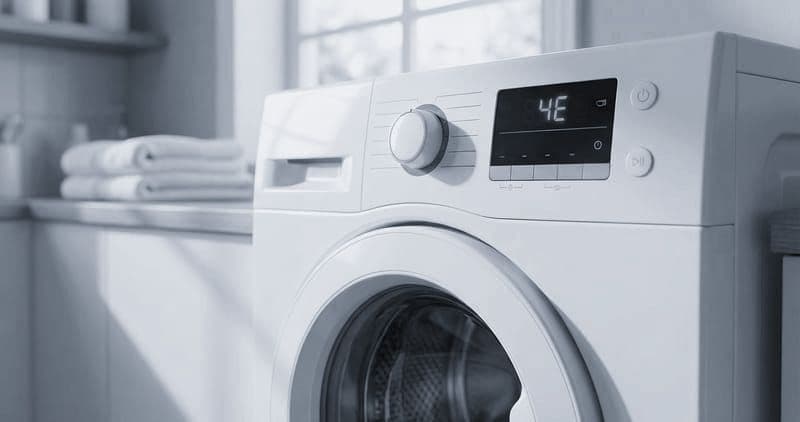
4E or 4C (Water Supply Error): The washer is not detecting incoming water within the fill timeout. Check that both supply valves are fully open. Inspect the inlet valve screens for mineral deposits. If screens are clear, test the solenoid coils on the inlet valve with a multimeter — each should read 400-900 ohms. A failed coil requires inlet valve replacement.
dE (Door Error): The door lock assembly (DC64-01538A) is not confirming door closure. Inspect the door strike for alignment. Test the lock mechanism by listening for the click-buzz-click sequence when you start a cycle. If the door lock does not energize, check the wiring harness connection. If wiring is good, replace the door lock assembly ($30-50).
UE or UB (Unbalance Error): The drum cannot achieve balanced rotation at spin speed. Redistribute laundry in the drum. If the error recurs with properly balanced loads, the shock absorbers (DC66-00470A) have lost their damping ability. Replace all four shock absorbers as a set.
Step 3: Fix Excessive Vibration (VRT Plus System)
Samsung's VRT Plus system uses three steel balls inside a sealed ring mounted on the outer tub. These balls roll to counterbalance uneven loads during high-speed spin. When the system fails:
First verify the machine is perfectly level using a bubble level placed on top. Adjust the leveling feet until the bubble is centered in both directions. Lock the feet with the jam nuts.
Check that the three rear transit bolts (large red plastic-topped bolts) have been removed. These bolts lock the drum for shipping and cause severe vibration if left installed on a new unit.
If the machine has been in use for several years and vibration has gradually worsened, the shock absorbers (DC66-00470A) are the most likely culprit. Samsung shock absorbers use a friction-based damping system that wears over time. Access them by removing the front panel — you will see four dampers connecting the outer tub to the base frame at approximately 45-degree angles. Test each by compressing and extending by hand — they should offer firm, even resistance. If any move freely or feel spongy, replace all four as a set ($40-60 for all four).
If the VRT Plus ring itself has failed (rattling metallic sound from inside the ring at any speed), the ring must be replaced. This requires complete tub removal and is typically a professional repair due to the labor involved.
Step 4: Fix Water Leaks From the Front
Water leaking from the front of a Samsung front-loader almost always traces to the door boot seal (DC64-00802A). Inspect the seal by pulling back its outer fold and looking for tears, cracks, or deformation in the rubber. Common failure points include the bottom of the seal where standing water collects and deteriorates the rubber, and any area where foreign objects have been caught between the door glass and seal.
If the boot seal is damaged, replacement is required. This is a 30-45 minute job: remove the outer wire spring clamp, peel the seal off the front panel flange, release the inner band clamp from the drum, and reverse the process with the new seal. Align the drain holes at the bottom of the new seal with the marks on the drum.
Less commonly, leaks originate from the dispenser housing. Check the dispenser-to-drum hose for cracks, particularly where it connects to the outer tub. Also inspect the dispenser housing for cracks caused by ice formation (if the machine is in an unheated space).
Step 5: Fix Drum Not Spinning or Weak Spin
If the drum rotates during wash but fails during spin, or spins weakly without reaching full speed, check these Samsung-specific causes:
The door lock may not be achieving its second-stage lock position required for spin. Listen for two distinct clicks when spin engages — the first is the door latch, the second is the speed-lock solenoid. If you only hear one click, the door lock assembly needs replacement.
Test the motor by entering diagnostic mode and running the spin test. If the motor does not activate at all, check the motor harness connection at the rear panel. Samsung direct-drive motors rarely fail mechanically but their hall sensors (which provide RPM feedback to the control board) can degrade. A failed hall sensor causes the control board to abort spin as a safety measure.
If the motor runs but the drum does not spin, the spider arm (DC97-16509A) may have cracked due to corrosion. With the rear panel removed, inspect the three arms for white powdery corrosion or visible cracks. A broken spider arm means the shaft turns but the drum does not follow.
Step 6: Fix Odor and Clothes Staining
Foul odor from a Samsung washer typically stems from mold colonization in the boot seal folds and behind the drum. Run the Self-Clean+ cycle (Temp + Rinse buttons held until display shows Cln) monthly as prevention.
If clothes emerge with orange or rust-colored stains, this indicates the spider arm corrosion is advanced — corroded aluminum particles are contaminating the wash water. Alternatively, the rear bearing seal has failed and the bearing itself is rusting. Either condition requires professional service and part replacement.
Dark gray or black stains indicate mold from the boot seal is transferring to clothes. Remove, clean, or replace the boot seal (DC64-00802A) to resolve this permanently.
Troubleshooting Common Issues
If your initial diagnosis does not resolve the Samsung washer problem:
- Multiple error codes appearing in sequence usually indicate a control board failure rather than multiple component failures. The board sends incorrect commands, triggering cascading errors across subsystems
- Intermittent failures that appear and disappear suggest a loose wire harness connection rather than a failed component. Check every connector by pressing firmly until you feel or hear a click
- If the washer works normally on some cycles but fails on others, the issue is likely cycle-specific — certain cycles use higher spin speeds or water temperatures that expose a marginal component failure
- A washer that trips the house circuit breaker indicates either a motor short (rare on Samsung) or water leaking onto electrical components, most commonly the door lock assembly or control board area
- If Smart Care app diagnosis (Samsung Smart Washer app pointed at the display) provides a different diagnosis than your inspection suggests, trust your physical inspection — the app cannot detect mechanical failures
Safety First — Know the Risks
Appliances involve high voltage (120-240V), pressurized water, gas lines, and chemical refrigerants. Over 400 DIY repair injuries are reported yearly. Our techs are licensed and insured — let them handle the risk.
Licensed & Insured · 90-Day Warranty · Same-Day Service
When to Call a Professional
Contact a professional Samsung washer technician if:
- The spider arm has cracked through and the drum is loose on the shaft — removal involves managing a heavy drum with sharp corroded edges
- The rear bearing requires replacement — this needs a bearing press and specialized seal installation technique
- The control board has visible liquid damage and you suspect a secondary electrical issue
- You smell electrical burning during operation, indicating an internal short that requires immediate professional isolation
- The washer is under Samsung's extended warranty for spider arm (check your model for class-action coverage)
Same-Day Appliance Repair
Fixed or It's Free
$89 → $0 Service Call & Diagnosis — offer ends May 25
Cost Comparison: DIY vs Professional
| DIY | Professional | |
|---|---|---|
| Parts | $30-150 depending on failure | $30-150 (same parts) |
| Labor | $0 | $150-300 |
| Time | 1-3h depending on repair | 1-1.5h |
| Risk | Medium — electrical and heavy components | Warranty on labor included |
The Real Cost of DIY
Average DIY attempt: $150-400 in tools you may use once, plus the risk of further damage. Our diagnostic visit costs $0 — we find the problem and give you an honest quote.
Licensed & Insured · 90-Day Warranty · Same-Day Service
Need Professional Help?
FAQ
Q: How do I enter diagnostic mode on a Samsung washing machine? A: On most WF models, simultaneously press Temp + Spin (or Delay End + Soil Level on some models) and hold for 3-5 seconds. The display will show 'd' or 'tSt' indicating diagnostic mode. Cycle through tests by pressing Spin repeatedly.
Q: What is the most common Samsung washer failure? A: Spider arm corrosion (DC97-16509A) is the most well-known Samsung-specific failure. The aluminum spider arm reacts with alkaline detergent residue over 3-5 years, eventually cracking and causing drum wobble, loud banging, and rust stains on clothes.
Q: Why does my Samsung washer vibrate excessively during spin? A: Common causes include worn shock absorbers (DC66-00470A), VRT Plus balance ring failure (steel balls degraded), uneven load distribution, unlevel machine, or shipping transit bolts still installed on a new unit.
Q: What does the Samsung washer UE or UB error code mean? A: UE means the washer cannot achieve balanced drum rotation during spin. Redistribute the load for immediate fix. If the error recurs with balanced loads, suspect worn shock absorbers or suspension rod dampers.
Need a certified technician? Book same-day repair


