How to Replace the Main Control Board on a Whirlpool Refrigerator
The main control board is the brain of your Whirlpool refrigerator — it manages the Adaptive Defrost timing, Accu-Chill temperature regulation, compressor operation, fan speeds, ice maker cycles, and dispenser functions. When this board fails, symptoms range from complete unit shutdown to erratic temperature swings, ice maker failures, or repeated error codes that do not clear after component replacement. Board replacement is an intermediate repair that requires careful connector documentation but no specialized tools.
On Whirlpool WRF (French door) and WRS (side-by-side) models, the main control board is located behind the rear panel in the fresh food section — typically at the upper middle or upper left area. On WRT (top-mount) models, it is behind a cover panel on the rear exterior near the top. The board uses a Whirlpool-specific part number that varies by model (common numbers include W11088499, W10503278, and W11305310 for recent models). Always verify the exact part number on the board itself or via model number lookup.
Before You Start
- Tools needed: Torx T20 screwdriver, Phillips #2 screwdriver, 1/4" nut driver, smartphone (for photographing connectors), masking tape and marker for labeling
- Parts needed: Whirlpool main control board — model-specific (~$120-$280)
- Time required: 30-45 minutes
- Difficulty: Intermediate
- Safety warning: Unplug the refrigerator. The control board operates on low voltage (3.3V-12V DC) so there is no high-voltage shock risk. However, incorrect connector reinsertion can permanently damage the new board — take photos of every connector before disconnecting.
Do You Have the Right Tools?
Refrigerant gauges ($200+), vacuum pump ($250), leak detector ($150), and EPA-certified recovery equipment. Our technician arrives with $15K+ in professional tools — your diagnostic is free.
Licensed & Insured · 90-Day Warranty · Same-Day Service
Step-by-Step Instructions
Step 1: Confirm control board failure via diagnostics
Before replacing, enter diagnostic mode (3-button sequence per tech sheet) and record all stored codes. Control board failures typically present as:
- F1E1 (board communication failure) that does not resolve with connector reseating
- Multiple unrelated codes from different systems simultaneously
- Board appears physically damaged (burnt components, swollen capacitors, corrosion)
- No response to any input (completely dead display, dark, no LED activity on board)
- Components tested individually are all good but system does not function together
Step 2: Unplug and access the control board
Unplug the refrigerator. The board location depends on your model:
- WRF/WRS (interior access): Remove the rear panel inside the fresh food compartment. This panel is held by several Torx T20 screws. The board is in a protective housing with a cover.
- WRT (exterior access): Remove the rear upper panel on the outside of the refrigerator. Board is mounted to the rear wall.
Step 3: Document all connector positions
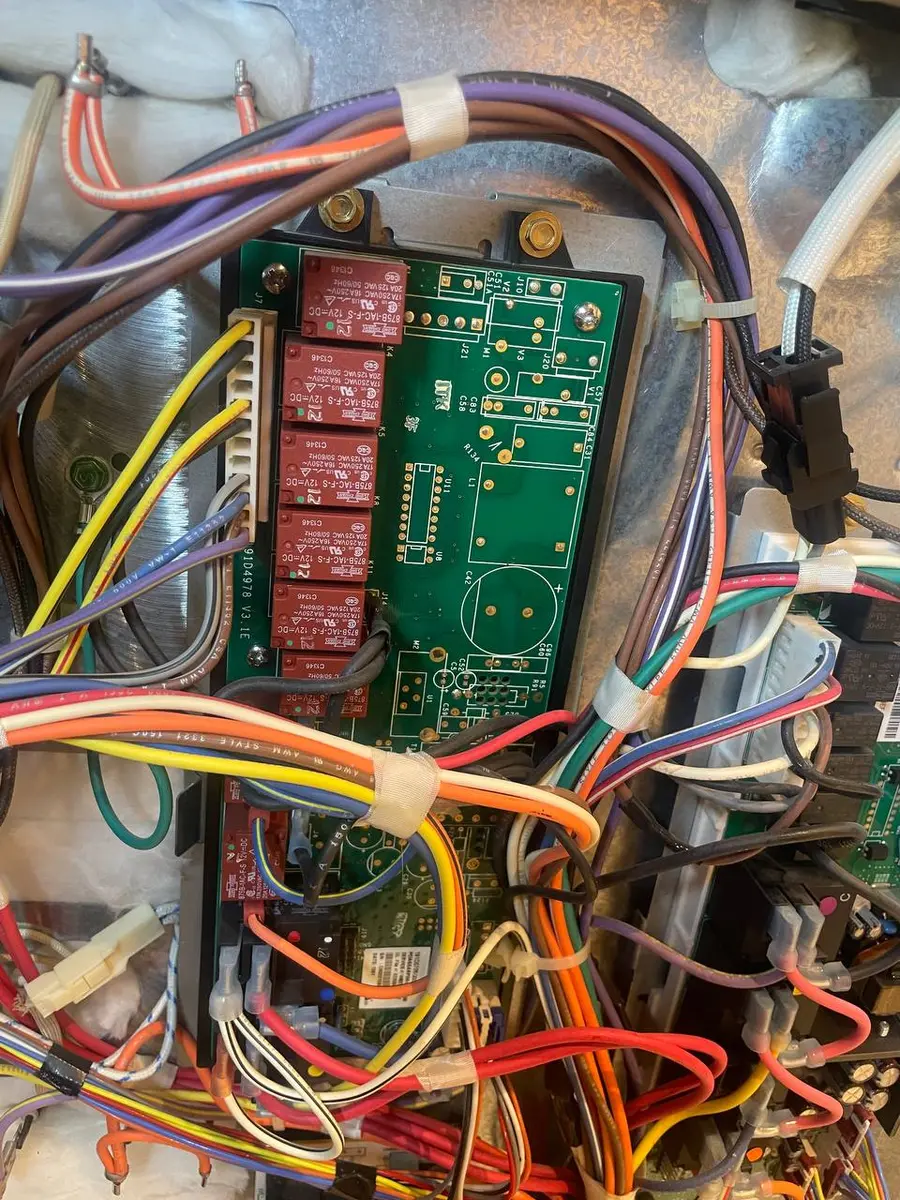
This is the most critical step. The control board has 6-12 wire harness connectors of various sizes. Using your smartphone, take multiple photos from different angles showing every connector and its exact position on the board. Additionally, label each connector with masking tape numbered 1 through N as you photograph. Most connectors are keyed (can only insert one way) but some share the same plug style and can be accidentally swapped.
Step 4: Disconnect all harness connectors
Starting from one side of the board, carefully disconnect each connector by pressing its locking tab and pulling straight out. Never pull on the wires themselves — always grip the plastic connector body. Some connectors are tight and require gentle wiggling while pressing the lock tab. Set the harness aside without disturbing the tape labels.
Step 5: Remove the board from its mounting
The board is secured to its housing with 3-5 screws or standoffs. Remove these and carefully lift the board out. Note any thermal pads, heat sinks, or grounding straps that connect to the board — these must transfer to the new board or be replaced.
Step 6: Transfer any hardware to the new board
Compare the old and new boards side by side. Transfer any heat sinks, thermal pads, or mounting hardware that came on the old board but is not included with the new one. Some Whirlpool replacement boards come with all hardware; others are board-only.
Step 7: Mount the new board and reconnect
Secure the new board in the housing with the same screws/standoffs. Reconnect all harness connectors using your photos and labels as reference — verify each connector seats fully with an audible click. Double-check all connections against your photos. A single swapped or partially-seated connector can prevent the refrigerator from functioning or damage the new board.
Step 8: Reassemble and power on
Reinstall the cover and rear panel. Plug in the refrigerator. The display should illuminate and the board will run initialization. Allow 5 minutes for the system to stabilize. Check that the display shows temperature settings and responds to button presses.
Step 9: Reconfigure settings after replacement
A new control board resets all user settings to factory defaults:
- Set fresh food temperature to 37 degrees F
- Set freezer temperature to 0 degrees F
- Re-enable Accu-Chill if desired (some models have this as a toggle)
- Reset ice maker to ON position
- The Adaptive Defrost system will start with frequent defrost cycles and learn usage patterns over 7 days
Step 10: Verify all systems in diagnostic mode
Enter diagnostic mode and run through each forced component test: compressor, evaporator fan, condenser fan, defrost heater, damper, ice maker harvest, water inlet valve, dispenser solenoid. Each component should activate during its test. If any component does not respond, double-check the corresponding harness connector is properly seated.
Whirlpool-Specific Board Considerations
Whirlpool control boards contain the Adaptive Defrost algorithm — a software routine that tracks door openings, compressor runtime, and ambient temperature to optimize defrost frequency. When you install a new board, this algorithm starts from zero. Expect more frequent defrost cycles (every 8-12 hours) for the first week until the board learns your usage patterns and extends defrost intervals to the optimal period (typically 24-48 hours for average use).
The Accu-Chill system is also board-controlled — it boosts compressor and fan speed after door-close events to quickly recover temperature. This feature is calibrated on the board and works from first power-on without learning period.
Some newer Whirlpool models have WiFi modules on the control board. After board replacement, you will need to re-pair the refrigerator with the Whirlpool app by running the WiFi setup process from scratch.
Safety First — Know the Risks
Refrigerant (R-134a/R-600a) requires EPA certification to handle. Improper discharge is a federal violation and health hazard. Our techs are licensed and insured — let them handle the risk.
Licensed & Insured · 90-Day Warranty · Same-Day Service
Troubleshooting After Replacement
- If the display is blank after reconnection, verify the UI board ribbon cable (flat flex cable connecting the display to the main board) is fully inserted. These are fragile — check for bent pins
- If the compressor does not start but the board appears powered, give it 10 minutes. Whirlpool boards have a compressor delay timer that prevents immediate restart after power restoration (protects compressor from short cycling)
- If the ice maker does not work after board replacement, verify the ice maker wire harness connector is seated and the ice maker is toggled ON in the user settings menu. Also check that the ice maker is not in a forced-off state from diagnostic mode
- If temperature readings seem wrong (display shows unrealistic numbers), a thermistor connector may be partially seated or on the wrong pins. Re-check all sensor connectors against your photos
- If F1E1 code appears immediately, the UI board and main board may be incompatible versions (rare on same-model replacement). Verify the new board part number exactly matches your model's specification
When This Fix Will Not Work
Call a professional if:
- The board failure was caused by a power surge that may have also damaged other electronics (UI board, compressor inverter, ice maker module). Multiple-component failure after a surge requires comprehensive diagnosis
- Your model uses a separate inverter board for the compressor (common on newer variable-speed compressor models). The inverter board is different from the main control board and requires separate diagnosis
- The harness connectors are damaged (melted pins, corroded contacts). Bad harness connections were likely the original cause of the board failure and will destroy the replacement board too
- You suspect the board failure was secondary to a compressor short — installing a new board without fixing the compressor will immediately blow the compressor output circuit on the new board
Same-Day Appliance Repair
Fixed or It's Free
$89 → $0 Service Call & Diagnosis — offer ends May 25
The Real Cost of DIY
Average DIY attempt: $150-400 in tools you may use once, plus the risk of further damage. Our diagnostic visit costs $0 — we find the problem and give you an honest quote.
Licensed & Insured · 90-Day Warranty · Same-Day Service
Cost Comparison: DIY vs Professional
| DIY | Professional | |
|---|---|---|
| Parts | $120-$280 | $120-$280 |
| Labor | $0 | $150-$250 |
| Time | 30-45min | 30min |
| Risk | Connector swap risk | Warranty on board + labor |
Need Professional Help?
Don't Void Your Warranty
Opening your appliance yourself may void the manufacturer warranty. Our repair comes with a 90-day guarantee, and we document everything for warranty compliance.
Licensed & Insured · 90-Day Warranty · Same-Day Service
FAQ
Q: How do I know my Whirlpool refrigerator control board is bad? A: Multiple simultaneous error codes, complete unit shutdown with no response, visible board damage (burnt spots, swollen capacitors), or components that test good individually but the system does not function together.
Q: Will I lose my Whirlpool refrigerator settings after board replacement? A: Yes, all user settings reset to factory defaults. Temperature settings, ice maker toggle, filter status, and WiFi pairing must be reconfigured. The Adaptive Defrost algorithm also resets and relearns over 7 days.
Q: Can I use a refurbished control board? A: Refurbished boards work and cost 30-50% less than new. Verify the refurbisher tests all relays and capacitors. A 90-day warranty minimum is standard from reputable refurbishers.
Q: How long does a Whirlpool refrigerator control board last? A: Typically 8-12 years. Power surges, lightning, and moisture ingress from leaking door gaskets can shorten lifespan. Using a surge protector extends board life significantly.